



Word Balloon

The Word Balloon (formerly known internally as the Rgnwnd for Region Window) is a component of Microsoft Actor and Microsoft Agent. It serves as a way for text to be "spoken" by the characters, appearing above Microsoft Agent characters when the Speak, Think, or Whisper methods are used. In Microsoft Actor implementations, balloon positioning is typically handled by the host application rather than exposed as native Speak, Think, or Whisper methods.
History
Rgnwnd Control
The Word Balloon initially started out as a component of the Utopia Custom Controls, under the internal name "Rgnwnd". Upon being dragged to a programmable form would create a "Rgnwnd Control" that could be customized with properties such as background color, text color, as well as various offset options. In Microsoft Bob, these word balloons functioned as panels that would nest other elements, such as buttons, textboxes, and various other controls, and would take up the whole form that they were dragged into, meaning a word balloon was its own window/dialog.
When Microsoft Bob 2.0 was scrapped in 1996, the Rgnwnd Control was reused inside of Microsoft Greetings Workshop 1.0 and 2.0, as well being deployed in Microsoft Office for the Office Assistant feature. From that point forward, all versions of Microsoft Office that supported Microsoft Actor and Microsoft Agent characters would re-use this same Microsoft Bob-era Rgnwnd Control until the removal of the Office Assistant entirely in future releases.[1]
Word Balloon
The word balloon was one of the earliest components to be integrated into Microsoft Agent, being a component since the Microsoft Agent Beta. Unlike the Rgnwnd Control, the Microsoft Agent word balloon could not nest controls and thus did not support buttons, textboxes, or any other content besides text. When questioned by developers, the Microsoft Agent development team would state various reasons as to why these controls were not supported, but that the primary reason behind this decision was to reduce Microsoft Agent's code size. The Microsoft Agent developer team stated this in a reply:
1. To save code. Adding support for controls in balloons would "balloon" Agent's code (pun intended).
2. You don't need them. Any programming language you are using to code Agent ALREADY has plenty of support to present controls in a window. There is NOTHING special or magical (other than being used by Office which has their own proprietary code for this) about controls in a balloon. In fact, I would suggest that control in normal dialogs are going to be MORE recognizable.
3. You can create your own balloons with controls. Evidence of this are the HTML Balloons that Nathan Dickerson offers.
4. It's unclear that controls in balloons make sense. Office derived this model from the ill-fated Microsoft Bob. It was decided at a time when there was no audio output.
5. Users can turn off Agent's balloons. It would be kind of bad if you depended on balloon for input and the user turned them off."
— Microsoft Agent, microsoft.public.msagent[2]
However, despite being one of the earliest components, gradual changes would occur over its existence. Initially, the default font utilized was MS Serif in the Microsoft Agent Beta, before transitioning to MS Sans Serif before the public release of Microsoft Agent. Additionally, the Microsoft Agent word balloon initially only started out with a "Speak" and "Whisper" method, with a "Think" method (and thus a bubble-styled word balloon) being first added in Microsoft Agent 2.0 build 1330. After this build, the balloon's behavior and appearance remained largely unchanged through the final release.
Re-implementations
Various re-implementations of the word balloon were created to accommodate Microsoft Agent characters. Below are the most notable re-implementations of the word balloon.
- HTML Balloons - Developed by Nathan Dickerson as an ActiveX control to allow for word balloons to support buttons, textboxes, and other various control options.[3]
- BalloonDialog - Balloon Dialog was an ActiveX control developed by SommyTech that allowed for Office Assistant-style word balloons for any application, supporting icons, labels, buttons, and other input options. It was later ported to the .NET Framework with version 7.0 of the BalloonDialog Control, and required a $14.95 USD registration fee.[4]
- Frontier Actor Rgnwnd Control - The Frontier Actor Rgnwnd Control is a re-implementation of the original Rgnwnd Control of Microsoft Actor, and features the same exact customization options as the original Utopia Custom Controls variant of the word balloon. However, it also supports other programs outside of Microsoft Actor, and can be used as a generic word balloon control for any application similar to the BalloonDialog product.
Gallery
-
 Icon for the Rgnwnd Control in the Utopia Custom Controls.
 -
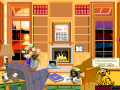 The Rgnwnd Control inside of Microsoft Bob, featuring an icon, two buttons, and text.
 -
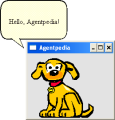 The Rgnwnd Control in use in a Visual Basic 3.0 application, featuring Rover.
 -
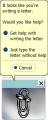 The Rgnwnd Control used in Office 97.
 -
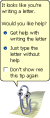 The Rgnwnd Control used in Office 2003.
 -
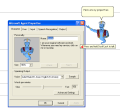 Genie using a word balloon in the Microsoft Agent Beta.
 -
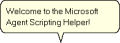 A Microsoft Agent word balloon.
 -
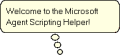 A Microsoft Agent think balloon.
 -
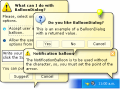 A showcase of BalloonDialog, a premium alternative to the Microsoft Agent word balloon that can be used outside of Microsoft Agent.
 -
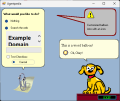 A demo of the Frontier Actor Rgnwnd Control, showcasing it being used for a Microsoft Actor, a Microsoft Agent, and outside of both.


Trivia
- The Rgnwnd Control line of word balloons was deprecated with the release of Microsoft Office 2007, and the Microsoft Agent line of word balloons was deprecated with the discontinuation of Microsoft Agent in 2009.
- Despite backlash from developers, Microsoft would never natively implement custom control support in Microsoft Agent word balloons.
- Word balloons essentially are an invisible dialog box with a balloon that maps to each corner of the dialog box.
- This is noticeable in both Microsoft Actor and Microsoft Agent, as in Microsoft Actor if a Rgnwnd Control is dragged to a form it will turn off the border and dock itself to take up the full window. As for Microsoft Agent, a similar behavior is observed with the balloon encompassing an invisible form with a Maroon transparency color set.
References
- ↑ https://groups.google.com/g/microsoft.public.msagent/c/3T4SR04bsjE/m/mLUgtD9EFVoJ
- ↑ https://groups.google.com/g/microsoft.public.msagent/c/ECDvMe7OrEU/m/sochbfyfJPAJ
- ↑ https://groups.google.com/g/microsoft.public.msagent/c/mEpLF-L1PKU/m/Q4BKmOxHAHUJ
- ↑ https://groups.google.com/g/microsoft.public.msagent/c/gLxGLGk1PL4/m/xgfTlIEhLHsJ