



DeskBot
 | |
 Screenshot of DeskBot running on Windows XP. | |
| Name | DeskBot |
|---|---|
| Developer(s) | BellCraft Technologies |
| Initial release | September 22nd, 2001 (24 years ago) |
| Latest version | 2.6.3 |
| Latest version release date | September 29th, 2007 (18 years ago) |
| Written in | Visual Basic 6.0 |
| Operating system | Microsoft Windows |
| Website | https://bellcraft.com/deskbot (Defunct) |
| Discontinued? | Yes |
DeskBot was a freeware desktop application developed by BellCraft Technologies[1] that could read the user's clipboard, read text/word documents, or tell the time using Microsoft Agent.
Usage
Through the context menu of the app, a user can read their clipboard, a text file, a word document, or a word or excel selection. Users can also enable or disable the option to announce time, or automatically read the clipboard. The user can hide the character, skip, pause, or stop the speech.
Through the options menu on the General tab, the user can have the program automatically start up with windows, hide the window of Deskbot when clicking the close button instead of exiting, show the Deskbot Splash Screen on Application Startup, or read pages with internet explorer with Deskbot. The user can also read their current clipboard on command, or customize how Deskbot announces time.
On the Character tab, the user can change the character associated with Deskbot. The user can also have the character be hidden by default on startup, or have the character show at the exact location the user last moved it to. The user can also have the character play Idling Level 3 animations, play read animations before the character reads text, play character sounds, or have the character be a custom size.
The Voice Tab allows users to change the TTS Voice the character uses and how the character speaks. On the top, there are 2 tabs called TTS Voice and Voice Modifiers. TTS Voice, as its name suggests, allows users to change the TTS voice of the character. The Voice Modifier tab allows users to change the pitch of the character, the speed which the character talks at, the volume of the Character, and the voice type of the character. (such making them Whisper) There is also a textbox at the bottom that allows users to hear what the modified character voice would sound like.
The Read tab allows users to input any text within the Textbox and have Deskbot read it out loud. The Greetings tab allows users to have Deskbot greet the user on startup. The user can have 5 different greeting messages that Deskbot can read, as well as the option to select a different greeting animation for any one of them. The final tab is the About tab, which displays the info of their Deskbot version.
Gallery
-
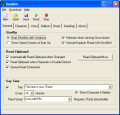 General tab in DeskBot's settings.
 -
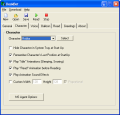 Character tab in DeskBot's settings.
 -
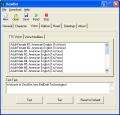 Voice tab in DeskBot's settings.
 -
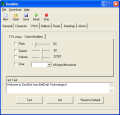 Ditto but on Voice Modifiers.
 -
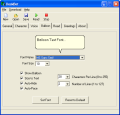 Balloon tab in DeskBot's settings.
 -
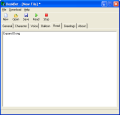 Read tab in DeskBot's settings.
 -
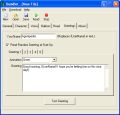 Greetings tab in DeskBot's settings.
 -
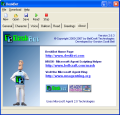 About tab as of DeskBot 2.6.3.


Trivia
- DeskBot is one of the 2 programs that have its own section on the BellCraft Forums, the first being MASH.
- DeskBot is one of the 4 freeware software that were on BellCraft's site.
- The other 3 programs are Pixie, BackgroundBot, and CharPackage.
- DeskBot was the second program that was released on BellCraft.
References
| Versions |
|  | |||||
|---|---|---|---|---|---|---|---|
| Microsoft characters |
| ||||||
| Software |
| ||||||
| Microsoft implementations | |||||||
| File formats | |||||||
