



KinitoPET: Kinito After Story
 This article or section contains controversial content about either a character or software. Even though the creator of the character or software is deemed controversial, it should be clear you should not harass anybody involved in the situation, as it makes problems worse.
Reason: The original creator of Kinito After Story, Laser Boy Studios, has a history of problematic behavior.
As of 2026, with MadCreeper's ownership of Kinito After Story on December 1st, 2025, using the program and the character are relatively risk-free.
 This article contains spoilers for KinitoPET. Please make sure you have played the game or watched the video first before reading this article.
  | |
 The thumbnail of Kinito After Story used on the GameJolt page. | |
| Name | KinitoPET: Kinito After Story |
|---|---|
| Developer(s) | Laser Boy Studios (former) MadCreeper7611 (current) |
| Initial release | May 10th, 2025 (10 months ago) |
| Latest version | 2.1.9506.40053 |
| Latest version release date | January 10th, 2026 (2 months ago) |
| Written in | VB.NET (formerly C#) |
| Operating system | Microsoft Windows |
| Website | https://kinitoafterstory.nekoweb.org (Defunct) |
| Download | https://tmafe.com/kinitopet |
KinitoPET: Kinito After Story is a freeware desktop application that utilizes Microsoft Agent technology released on May 10th, 2025.[1] It was originally released by Laser Boy Studios, but is now developed by MadCreeper7611. The program serves as a fan made continuation of KinitoPET, a BonziBUDDY-inspired horror game developed by Troy En, taking some inspiration to the Doki Doki Literature Club mod "Monika After Story". The events take place after the end of the game when the player installs a rewrite of the lost KinitoPET program to bring Kinito back.
Synopsis
After the events of KinitoPET, the player installs a rewrite of the deleted program that not only restores Kinito, but gives him a brand new window called KinitoLANTIS. After a short introduction, Kinito acts the same way Bonzi does in BonziBUDDY Rewritten, randomly telling different facts and jokes, surfing the web, and otherwise killing time.
The primary focus of the program is extended interactions with Kinito and simulating the experience of what it is like to have a desktop assistant on the user's computer.
Gallery
-
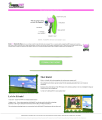 A screenshot of https://tmafe.com/kinitopet.
 -
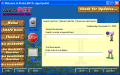 Search menu inside of Kinito After Story.
 -
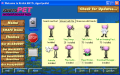 Interact menu inside of Kinito After Story.
 -
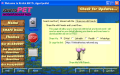 Share menu inside of Kinito After Story.
 -
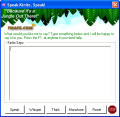 The Speak window in Kinito After Story.
 -
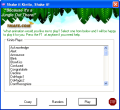 The Animate window in Kinito After Story.
 -
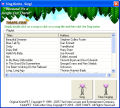 The Sing Songs window in Kinito After Story.
 -
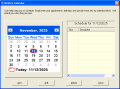 Kinito's Calendar in Kinito After Story.
 -
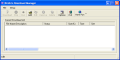 The Download Manager in Kinito After Story.
 -
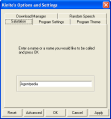 The Options menu in Kinito After Story.
 -
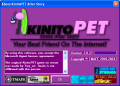 The About window in Kinito After Story.
 -
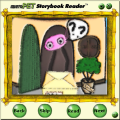 The KinitoPET Story Reader program with New Beginnings open.
 -
 The original version of Mail.jpg before December 17th, 2025.
 -
 The Mail.jpg easter egg after December 17th, 2025.


Trivia
- Kinito After Story used to be developed by Laser Boy Studios, but months later, he was soon replaced by MadCreeper7611 due to Laser Boy Studios being problematic.[2]
- Before his replacement, Laser Boy Studios designed some of the program's UI, with the logo using LogoMan404's Bonzi-Styled KinitoPET logo as a base, and provided almost the majority of the dialog.
- In earlier versions of Kinito After Story as well as leftover files of when Laser Boy Studios used to develop the program, Kinito would have shown up to reenact the True Ending from the prequel game the moment the uninstallation of the program began. After uninstallation, it would have redirected to a secret TK page on the KinitoPET site[3], though after the installation software was switched to WISE, the cutscene was removed.
- Kinito After Story is based on BonziBUDDY Rewritten, which is why most jokes and facts were intact and/or slightly changed.
- The home button used to redirect to its own navigator page rather than TMAFE.[4]
- In the about window, clicking above the first "i" in the word "KinitoPET" redirects to a secret "I'm sorry" page that is on the original KinitoPET site.[5]
- Just like BonziBUDDY Rewritten and PeedyBUDDY, Kinito After Story was originally coded in C#, but eventually was remade in Visual Basic .NET.
- However, unlike BonziBUDDY Rewritten, PeedyBUDDY and Kinito After Story were instead recreated using the source code of the new BonziBUDDY Rewritten instead of being ported over.
- There is currently one Easter egg that has not been ported over to TMAFE.COM called Mail.jpg[6], which showed that that in the lore, two fictional characters Jaxon and Logan Alder rebuilt the KinitoPET program from the ground up. The reason for this not being ported is due to Logan Alder's name sounding a lot similar to Laser Boy Studios' real name, Logan
Abner.- In December 17th 2025, the Mail.jpg image was changed to blur Logan Alder's name. It is unknown whether it was Laser Boy venting, self-censoring, or part of the lore.
- In January 14th, 2025, the kinitoafterstory.nekoweb.org redirect was shut down for violations of the NekoWeb TOS, taking the Mail.jpg easter egg with it.
- The "sing songs" feature used to work by finding the song's .wav file the "Songs" sub directory and then playing it. In version 2.0 and later, however, the songs were spoken through text-to-speech like the original program to save up storage. This meant KinitoPET could sing any audio or song on versions prior to 2.0, though after the update, the user can no longer have Kinito sing any song.
- The "play audio" feature used to work by playing the selected audio file through the user's default music player. This meant KinitoPET could play not just .WAV files, but .MP3s, .OGGs, and .FLACs prior to 2.0, though after the update, the user can only play .WAV files.
References
- ↑ https://tmafe.com/kinitopet
- ↑ https://gamejolt.com/p/let-s-talk-gawmsrbf
- ↑ https://tmafe.com/kinitopet/tk
- ↑ https://web.archive.org/web/20250914173935/https://kinitoafterstory.nekoweb.org/home
- ↑ https://kinitopet.com/imsorry
- ↑ https://web.archive.org/web/20251206211327/https://kinitoafterstory.nekoweb.org/Mail.jpg

| Versions |
|  | |||||
|---|---|---|---|---|---|---|---|
| Microsoft characters |
| ||||||
| Software |
| ||||||
| Microsoft implementations | |||||||
| File formats | |||||||
| Websites |  | |
|---|---|---|
| Software | ||
| Characters | ||