TMAFE.COM is currently experiencing a false positive from Xfinity Safeguard, causing the main site to throw the error "SSL_ERROR_RX_RECORD_TOO_LONG". If you happen to be an Xfinity user and are experiencing this error, remove the s from "https://", and click the "Proceed Anyway" on the warning which will allow you to visit the site. This should hopefully be resolved once Konnor88 comes back online. - MadCreeper7611
PeedyBUDDY is a freeware desktop application that utilizes Microsoft Agent technology based off of the 1999 version of BonziBUDDY. It was developed by MadCreeper7611 and was released on March 5th, 2025.[1] It is supposed to recreate BonziBUDDY 2 (the program that included Peedy as the default Microsoft Agent desktop assistant).
Differences from BonziBUDDY 2
Unlike BonziBUDDY 2, which utilized a right click menu, PeedyBUDDY has a "PeedyLAND" menu similar to the one found in BonziBUDDY 3, which utilized Bonzi instead of Peedy.
The calendar in PeedyBUDDY uses a giant version of the Windows Forms calendar, unlike the one in BonziBUDDY 2 which was a custom calendar made from scratch.
PeedyBUDDY has 5 wooden buttons in the "PeedyLAND" menu, with only one of them being from the original. They are labeled "Home", "TMAFE Home", "Get BlobBUDDY", "Get MaxALERT Rewritten", and "Get PeedyBUDDY". The wooden buttons in the original software were not added until version 3, but then was removed in the next major version.
PeedyBUDDY lacks features the original has, like the ability to read webpages, read emails, and storing credit cards. BonziBUDDY 2 lacks being able to play .MSH files and play animations, which PeedyBUDDY can do.
Development
With the following success of BonziBUDDY Rewritten, MadCreeper decided to make a new Microsoft Agent application which will soon be PeedyBUDDY. He wanted to make the program based off the 1999 version of BonziBUDDY. When the first public beta of the program came, most of the features such as the Sing Songs, Read Stories, and Download Manager were not there. However, as soon as version 1.0 released, the program gained the Sing Songs feature, the Read Stories feature, and a new feature called Add-ons. Add-ons could do many things such as add new Jokes, Facts, Songs, or Storybooks.
Screenshot of the book "Peedy and the New Era" in the Storybook Reader.
Trivia
Unlike BonziBUDDY Rewritten, PeedyBUDDY's first public version was a beta.
Like BonziBUDDY Rewritten, PeedyBUDDY was originally coded in C#, but soon was remade in Visual Basic .NET.
In older versions of BonziBUDDY Rewritten, clicking above the "i" on the word "Bonzi" would redirect the user to https://www.bonzibuddy.tk/. However, PeedyBUDDY's about window never had a redirect due to the lack of an "i" in the title, PeedyBUDDY, and also no site similar to the "REST IN PISS FOREVER MISS" with Peedy instead.





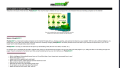 A screenshot of https://www.tmafe.com/peedybuddy.
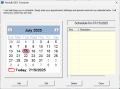 The calendar inside of PeedyBUDDY.
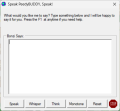 The Speech window inside of PeedyBUDDY
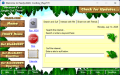 The Interact tab inside of PeedyBUDDY
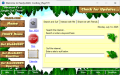 The Search tab inside of PeedyBUDDY
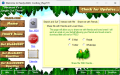 The Share tab inside of PeedyBUDDY
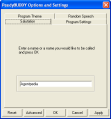 Options menu inside of PeedyBUDDY.
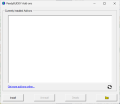 The add-ons menu inside of PeedyBUDDY.
 PeedyBUDDY 1.3 about window.
 Screenshot of the book "Peedy and the New Era" in the Storybook Reader.


