



Actor Toolkit
 | |
 | |
| Name | Actor Toolkit |
|---|---|
| Developer(s) | Konnor88 |
| Initial release | November 19th, 2025 (4 months ago) |
| Latest version | 3.1.0.178 |
| Latest version release date | January 31st, 2026 (2 months ago) |
| Written in | VB.NET |
| Operating system | Microsoft Windows |
| Website | https://tmafe.com/products |
| Download | https://tmafe.com/downloads/ActorToolkit3_1.zip |
The Actor Toolkit (formerly known as the Microsoft Actor Properties Viewer + Decompiler) is a freeware properties viewer, decompiler, and viewer software developed by Konnor88 that displays Microsoft Actor characters using Frontier Actor.
The program features a multi-document interface like the Microsoft Agent Scripting Helper, with the sidebar having direct links for each window, specifically the Main window, the Script window, the Properties Viewer window, the Decompiler window, the Agentpedia table generator, the Desktop Actor feature, a word balloon testkit window, a window to download more Microsoft Actors, and the settings window.
A guide was added in build 127 and features various options in a word balloon, such as launching some of the available windows or choosing a different guide. Currently, the guide feature uses a beta version of the TMAFE's Microsoft Actor version.
In version 2.1, Frontier Actor was updated to beta build 294, introducing a Speak method similar to that of Microsoft Agent and the addition of the word balloon testkit. Additionally, the amount of files needed to run the program was cut down significantly, requiring only FrontierUtopia.dll (Frontier Actor's core), FCCWAVMIX.dll (Frontier Actor's custom WAV interpreter), and defaultactions.h (contains action names to be loaded into the combobox).
Version 3.0 introduced scripting support, allowing users to generate Actor Toolkit Scripts (.ATS files) to play back with the program, using a scripting language similar to MASH scripts (which is influenced by classic Visual Basic code itself), but also influenced by modern Visual Basic .NET code). Frontier Actor was updated to build 301 in this release.
The latest version was released on January 31st, 2026.
Usage
Most forms contains an "Open ACT..." or "Load" button that can be used to select an .ACT file. Once the .ACT file is loaded, a user will be able to utilize all functions of the whichever window the .ACT file was loaded into. For example, if the user loads an Actor file inside of the main window (which uses a combobox instead), the user will be able to preview the name and all animations for that character and script them, while if loaded in the Properties Viewer window, the user will be able to see all known properties of the Microsoft Actor.
Gallery
Version 1.0
-
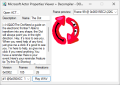 Screenshot of MAPVD with a Microsoft Actor 2.0 character, Dot.
 -
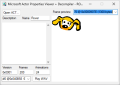 Screenshot of MAPVD with a Microsoft Actor 1.0 character, Rover.


Version 2.x
-
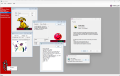
-
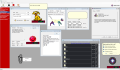 Screenshot of the Actor Toolkit as of version 2.1.

Trivia
- Formerly, the reason it cannot render the characters directly like the Microsoft Agent Properties Viewer can with Microsoft Agent characters is because Microsoft Actor does not have a modern public programming API, while Microsoft Agent does.
- However, this was changed in version 2.0 as the program now uses a beta version of Frontier Actor.
- The release of this program represents the first documented and publicly available tool capable of successfully decompiling a Microsoft Actor character. Prior to this program, no complete decompilation method for .ACT files had been published.
- Actor Toolkit identifies and extracts Vector-based Windows Metafile (WMF) artwork used by Microsoft Actor, a notable distinction from the bitmap-based 256-color image pipeline used by later Microsoft Agent (.ACS) files.
| Software |
|  | ||||
|---|---|---|---|---|---|---|
| Characters |
| |||||
| File formats | ||||||
| Websites |  | |
|---|---|---|
| Software | ||
| Characters | ||