


Universal Character Scripting Helper
 | |
 Screenshot of the Universal Character Scripting Helper with Rover. | |
| Name | Universal Character Scripting Helper |
|---|---|
| Developer(s) | Konnor88 |
| Initial release | November 19th, 2025 (5 months ago) |
| Latest version | Release Candidate 1 |
| Latest version release date | April 29th, 2026 (6 days ago) |
| Written in | VB.NET |
| Operating system | Microsoft Windows |
| Website | https://tmafe.com/products |
| Download | https://tmafe.com/downloads/UCSH_RC1_Installer.exe |
The Universal Character Scripting Helper (UCSH, formerly known as the Microsoft Actor Properties Viewer + Decompiler and Actor Toolkit) is a freeware scripting application, properties viewer, decompiler, and viewer software developed by Konnor88 that mixes Microsoft Agent with a re-implementation of Microsoft Actor using Frontier Actor.
The program features a multi-document interface like the Microsoft Agent Scripting Helper, with the sidebar having direct links for each window, specifically the Main window, the Script window, the Properties Viewer window, the Decompiler window, the Agentpedia table generator, the Desktop Actor feature, a word balloon testkit window, a window to download more Microsoft Actors, and the settings window.
Development
Microsoft Actor Properties Viewer + Decompiler
Initially, the program began development under the Microsoft Actor Properties Viewer + Decompiler, being released initially on November 19th, 2025 following community efforts to understand Microsoft Agent's predecessor Microsoft Actor. Upon launch, this program allowed for a user to select a compatible .ACT file and view the properties (such as name and description) while also allowing preview of the raw vector graphics that the majority of Microsoft Actor characters consist of. These developments kickstarted the Frontier Actor project, which aimed to re-implement Microsoft Actor functionality the Utopia Custom Controls on modern versions of Windows.
Actor Toolkit
With Frontier Actor becoming more developed over the next month, the program was updated to 2.0 build 122 and rebranded as the Actor Toolkit, introducing a way to view and render the Actors, the separation of the properties viewer and decompiler, a link to download more Microsoft Actors, a desktop pet feature, and a transparency color setting for usermade ones. A guide would be added in build 127 and features various options in a word balloon, such as launching some of the available windows or choosing a different guide.
In version 2.1, Frontier Actor was updated to beta build 294, introducing a Speak method similar to that of Microsoft Agent and the addition of the word balloon testkit. Additionally, the amount of files needed to run the program was cut down significantly, requiring only FrontierUtopia.dll (Frontier Actor's core), FCCWAVMIX.dll (Frontier Actor's custom WAV interpreter), and defaultactions.h (contains action names to be loaded into the combobox).
Version 3.0 introduced scripting support, allowing users to generate Actor Toolkit Scripts (.ATS files) to play back with the program, using a scripting language similar to MASH scripts (which is influenced by classic Visual Basic code itself), but also influenced by modern Visual Basic .NET code). Frontier Actor was updated to build 301 in this release.
Universal Character Scripting Helper
On February 11th, 2026, a post was made on the Microsoft Agent Forums on the development of Actor Toolkit 4.0, which was codenamed the "Universal Character Scripting Helper" at the time.[1] A demonstration video featuring Merlin, Genie, Rover, Scribble, Agent Blue, and a Microsoft Bob prop file interacting with each other was also shared that same day on the forum, with community reactions being mostly positive.[2] Upon this initial positivity, the program would remain in development for two months, with public beta 1 being released on April 26th, 2026.[3] Public beta 1 introduced Microsoft Agent character support, including multiple Microsoft Agent Scripting Helper feature re-implementations, and debuted features like the Sing window's piano, YouTube link support for the Speak Wave window, and an auto-recovery feature if the program crashes.
A release candidate was prepared for testing and released on April 29th, 2026 three days later,[4] enabling some of the features that were not enabled for public beta 1 including screen effects, the separate guide window, and the program's script window swapping over to Scintilla, which is the same component that Notepad++ uses.[5] In addition, a delay script option that allows the user to delay when the script starts, improvement to the sound effects menu, an updated logo, a startup window, and various bug fixes were among some of the features in release candidate 1.
Usage
Upon startup, a user will be prompted with a welcome window, which features a tip, options for a new .ATS script, a new Microsoft Agent character (via the Microsoft Agent Character Editor module), editing an existing .ATS script, editing and converting an existing .MSH script, and a button to launch an auto-recovered script. Once the welcome window is closed or if a user choice is selected, the user will be met with three windows: Main (Actor) for Microsoft Actors, Main (Agent) for Microsoft Agents, and Script for the generated script.
Like the Microsoft Agent Scripting Helper, the user can utilize various functions on the main window to add actions to script, including showing actions, hiding actions, gesturing actions, moving actions, animation actions, and speak actions to name. Additionally, various child windows can be accessed on the left-hand toolbar like MASH, including property viewers, Agentpedia character table generators for articles, decompilers, links to download more characters, TTS options, sing options, sound effects, and screen effects to name a few.
At the top of the program is a toolstrip where the user can start a new script, open a script, save a script, play a script, stop a script, find and replace inside the script, toggle the left-side menu bar, and a button to hide all characters.A menustrip is also available above the toolstrip with standard File, Edit, View, Script Windows, and Help options.
Gallery
Pre-UCSH
Version 1.0
-
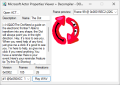 Screenshot of MAPVD with a Microsoft Actor 2.0 character, Dot.
 -
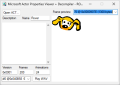 Screenshot of MAPVD with a Microsoft Actor 1.0 character, Rover.


Version 2.x
-
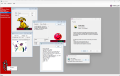
-
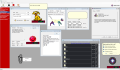 Screenshot of the Actor Toolkit as of version 2.1.


Post-UCSH
-
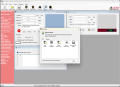 Screenshot of UCSH as of release candidate 1.

Trivia
- Originally, the reason it cannot render the characters directly like the Microsoft Agent Properties Viewer can with Microsoft Agent characters is because Microsoft Actor does not have a modern public programming API, while Microsoft Agent does.
- However, this was changed in version 2.0 as the program now uses a beta version of Frontier Actor.
- The release of this program represents the first documented and publicly available tool capable of successfully decompiling a Microsoft Actor character. Prior to this program, no complete decompilation method for .ACT files had been published.
- Actor Toolkit identifies and extracts Vector-based Windows Metafile (WMF) artwork used by Microsoft Actor, a notable distinction from the bitmap-based 256-color image pipeline used by later Microsoft Agent (.ACS) files.
References
| Software |
|  | ||||
|---|---|---|---|---|---|---|
| Characters |
| |||||
| File formats | ||||||
| Websites |  | |
|---|---|---|
| Software | ||
| Characters | ||